Control your DAW with ChatGPT
Published October 2026
Yes, ChatGPT can work on your DAW projects — not by writing you a tutorial, but by calling tools. Add the Doseedo MCP server as a custom MCP server in ChatGPT and it can list the sessions in your account, read one as a full arrangement, edit it, convert a project between Logic Pro, Ableton Live, FL Studio, Pro Tools, REAPER and five more formats, separate a mix into stems, transcribe audio to notes and generate music. With Dø Desktop running on your Mac, the edits ChatGPT makes land in your open Logic Pro project within seconds — from the ChatGPT app on your phone.
Install in ChatGPT
ChatGPT connects to remote MCP servers over HTTPS. Doseedo's is hosted, so there is nothing to run locally, and it speaks OAuth — which matters, because ChatGPT's form has no field for an API key.
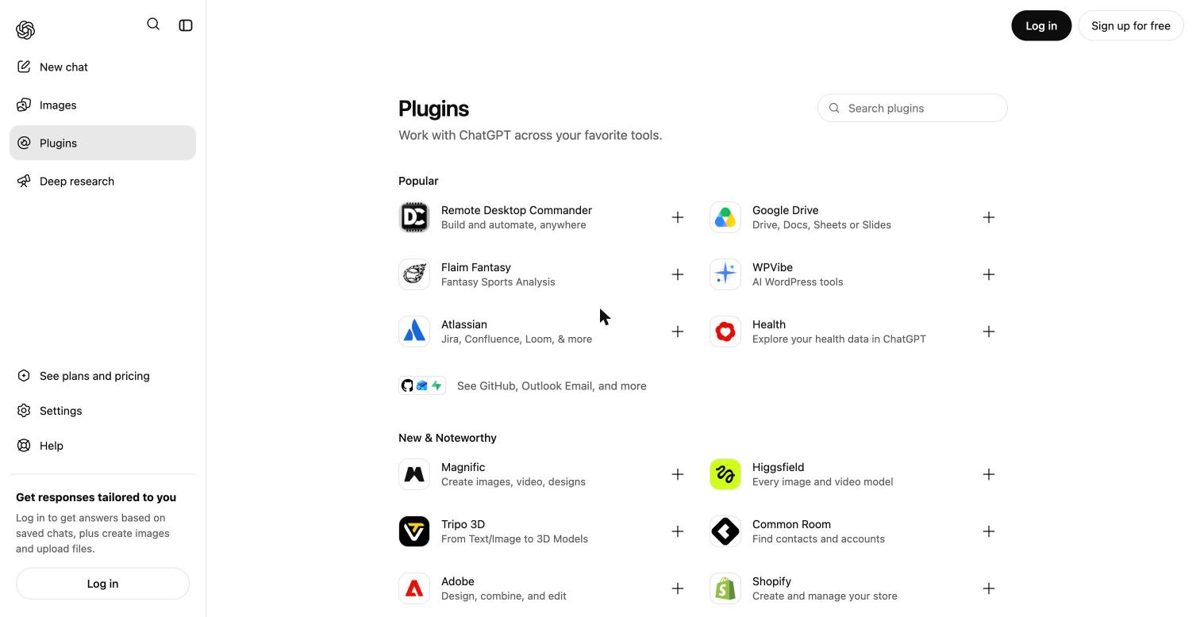
- Open ChatGPT → Plugins (
chatgpt.com/plugins). On accounts that still show the older layout it is Settings → Apps & Connectors → Advanced settings → Developer mode, then back to Apps & Connectors. - Select +, then Add custom MCP server.
- Name it Doseedo and give it a description — the model reads that description when deciding to use the server, so say what it is: "Read and edit my DAW sessions; convert projects between Logic, Ableton, FL Studio, Pro Tools and REAPER; separate stems; transcribe; generate music."
- Under Connection, paste the server URL, including the
/mcppath:https://api.doseedo.com/mcp - Set authentication to OAuth. Leave client id and secret blank — Doseedo registers the client automatically.
- Accept the warning about unverified servers and create it. ChatGPT opens Doseedo's sign-in page: sign in, click Approve, and the grant shows up under Settings → API keys as
MCP · ChatGPT, revocable any time.
Custom MCP servers are a feature of ChatGPT's paid plans, and on Business, Enterprise and Edu a workspace admin may have to allow them first. Labels move between releases; the shape — a name, a description, an HTTPS URL ending in /mcp, OAuth — does not.
What to ask it
Then talk about the project, not the API. ChatGPT reads the session first — every track with its ids, regions in beats and seconds, mixer levels in dB, plugin chains, tempo, markers — then submits the edits:
> List my Doseedo sessions.

> In "Bridge Demo": shorten the intro by four bars, pull the
  lead vocal up 2 dB, and put a Channel EQ on the drum bus.

> Here's a bounce of the song. Split it into stems and
  build me a Logic session with MIDI for the bass.

> Convert this Ableton set to Pro Tools and tell me what
  won't survive the trip.

> What key and tempo is this recording in? Write a bass
  line that fits and render it on an upright bass.
ChatGPT asks you to confirm actions that write — an edit, a conversion, a render — so a batch of edits is one confirmation, not one per region. Reading a session, quoting a cost and the analysis tools (key, tempo, chords) run without one.
What works from ChatGPT, and what does not
| You want | From ChatGPT |
|---|---|
| Edit a Logic project live | Yes, with Dø Desktop running on the Mac that has the project open; otherwise the edits persist and apply when it next opens. |
| Edit an Ableton, FL, REAPER or Pro Tools project | Yes, as a file: import it as a session, edit, download or convert the result. Nothing drives the running app. |
| Convert a project between DAWs | Yes — ten formats, 75 directions, rebuilt natively. |
| Separate stems, transcribe, detect chords and key | Yes; results come back as download links that work for 24 hours. |
| Generate music or a part | Yes — a song from a prompt, or your exact notes played by a modelled instrument. |
| Press play, arm a track, move the playhead | No. This edits the session, not the console. |
| Use files on your disk without uploading them | From ChatGPT, audio has to be uploaded (it cannot see your filesystem); from a terminal client it can stay local. |
The one DAW driven live is Logic Pro, through Dø Desktop on macOS; the scope table for every DAW is on the hub.
ChatGPT versus a terminal agent
The server is the same; the client changes what is convenient. ChatGPT is the right client when you are away from the machine — the phone app on a train, asking for a structural change that is waiting in Logic when you sit down — and for anyone who does not live in a terminal. A coding agent (Claude Code, Cursor, Codex) is better when the audio is on your disk: it passes local paths, so your samples never upload, and it can run the curl that drops a finished project into ~/Downloads. Both see the same 33 tools.
Cost is the same from either: one credit pool, metered exactly as on the site, and ChatGPT can ask doseedo_quote before anything expensive — a separation is 20 credits flat, a conversion one credit, a 30-second render ten; reads, quotes and the key/tempo/chord analysis tools are free. The grant is revocable from Settings → API keys without touching ChatGPT.
Add it to ChatGPT
Plugins → Add custom MCP server → paste the URL → OAuth. Then ask ChatGPT what is on track 3.
The Doseedo MCP server →FAQ
Can ChatGPT control my DAW?
Yes, through the Doseedo MCP server added as a custom MCP server in ChatGPT. It reads and edits DAW sessions, converts projects between ten DAW formats, separates stems, transcribes and generates. Live edits to an open project are Logic Pro on macOS, via the Dø Desktop bridge; every other DAW is handled as a project file.
Can ChatGPT edit a Logic Pro project?
Yes. ChatGPT reads the session, submits the edits, and with Dø Desktop running they land in the open Logic project within seconds; with it closed they persist and apply at the next open or download. Nothing drives the transport.
Can ChatGPT control Ableton Live or FL Studio?
As project files, yes: import, edit, convert, download. Not the running application — a live Ableton set is AbletonOSC territory and FL has its own MIDI Controller Scripting API.
Does it need an API key?
No. ChatGPT signs in with OAuth on the first call; the grant appears in your Doseedo settings as "MCP · ChatGPT" and can be revoked there. ChatGPT's form has no header field, so an API key is not an option there — OAuth is the route.
Is it free?
The server is free to connect and metered like the rest of a Doseedo account — the same credit pool and quotas as using the site, with a free tier. Custom MCP servers themselves are a paid-plan feature on ChatGPT's side.
The Doseedo MCP server · one URL, every client
- Logic Prolive edits in the open project
- Ableton Livebuild, read, convert .als
- FL Studioread, convert .flp
- Pro Toolsmove .ptx between DAWs
- REAPERread, edit, convert .rpp
- Any AI agentwhat works today
- Claude & Claude Codephone, desktop, terminal
- ChatGPTas a custom MCP server
- Cursormcp.json, one entry
- Gemini CLIgemini mcp add
- OpenAI Codexcodex mcp add
- VS Code Copilotmcp.json, type http
- All 33 toolsthe reference
- Convert projectsten DAW formats, 75 directions
- Separate stemsvocals, drums, bass, more
- Audio to MIDItranscription, chords, key
- Generate musicsongs, parts, covers
- Bounce offlinethrough real plugins
- Swap a drum packaudio stays local